Connecting your domain
Your Cobber subdomain, a subdomain of your own, or your top-level domain — and how to point it here.
Quick answers
10 questions · click to openDo I need to buy a new domain?
No. You can use a domain you already own — either the top-level domain or a subdomain of it. A free Cobber subdomain is also always available for preview and admin access.
Will pointing a subdomain at Cobber affect my main website?
No. A subdomain like action.yourmovement.org.au is independent of your main site. Your existing yourmovement.org.au and www. site keep running exactly as they do now.
What exactly do I put in DNS?
Cobber tells you. There is no generic list to copy — the Go Live page in your dashboard shows exactly what to do for your address.
How do I know I got the DNS records right?
The Go Live page checks them for you every time it loads, and shows what it actually found against what it expects. A record that exists but has a typo shows as pointing somewhere else, which is the failure you would never spot by reading it back at your registrar.
I have pointed my domain at Cobber but it still shows the Cobber homepage. Why?
Your address only starts serving your site once Cobber has seen the DNS records pointing here. That check runs every time the Go Live page loads, and you can press Check again on the domain step to run it straight away — so after DNS propagates, open Go Live to confirm it.
The domain step is ticked but the certificate is stuck. What now?
Look at the record check on the Go Live page. Both an A record and an AAAA record have to point at Cobber, and a certificate will not issue while either one is wrong — so the site can look fine while the padlock never arrives.
Do I have to sort out the HTTPS padlock?
No. Once your address points at Cobber, we provision and renew the security certificate for you, so the padlock just works.
Can we connect more than one address?
Yes. Start on the Cobber subdomain, add a subdomain of your own for launch, and later add your top-level domain — all pointing at the same content. Nothing breaks as you add addresses.
What happens to my Cobber subdomain after I connect a domain?
Once your primary custom domain is connected and DNS has been verified, visitors who open a published page or event on your Cobber subdomain are redirected to the same URL on your connected address. Unpublished drafts stay on the subdomain for your team to preview while logged in. The subdomain also stays available for dashboard login.
Is there a technical reason to prefer a separate domain?
No. A subdomain of your existing domain is fully supported and routes identically to a top-level domain. During a transition a subdomain is usually the better choice: it keeps your branding and avoids registering or maintaining an extra domain.
There are two separate things people mean by “domain”, and Cobber handles them independently. This page is about your web address — the URL supporters type or click to reach your pages. For the address your email comes from, see authenticating your sending domain.
Your three options
Every Cobber site starts on a free Cobber subdomain. From there you can connect any address you control. These are the options, from simplest to most branded:
| Option | When to use it |
|---|---|
Cobber subdomainyourmovement.cobberhq.com.au |
Works instantly with zero setup. Use it to build pages, preview changes, and log in to your dashboard. Public visitors are not meant to use this as your live address once a custom domain is connected. |
Subdomain of your domainaction.yourmovement.org.au |
Keeps your branding while leaving your existing main site untouched. Ideal during a transition. |
Your top-level domainyourmovement.org.au |
The full switch — your whole public site is served by Cobber. Best once you’re ready to move everything. |
Preview on the Cobber subdomain
Before you connect a custom domain, your pages are reachable on your Cobber subdomain so you can check them in a real browser. That address is for preview and testing — it is not indexed by search engines.
Your team logs in at the same subdomain (yourmovement.cobberhq.com.au/dashboard).
That login address does not change when you connect a custom domain.
Using a subdomain during a transition
A subdomain like action.yourmovement.org.au is often the smoothest choice while
you’re moving across from another platform. Your existing main website
(yourmovement.org.au and www.yourmovement.org.au) keeps running exactly as it
does today, untouched, while specific pages — donation pages, petitions, sign-up
and membership forms — live on the Cobber-connected address.
From a supporter’s point of view it still looks and feels like you, because it’s still your domain. And because it’s a subdomain, there’s nothing to buy and nothing to migrate on your main site. When you’re ready, you can move the apex domain across too.
Is there a technical reason to prefer a separate domain instead? No. A subdomain of your existing domain is fully supported and routes identically to a top-level domain — all your pages (including action pages) are served the same way. A subdomain is usually the better choice during a transition: it keeps your branding and avoids registering or maintaining an extra domain.
How routing works
Connecting an address takes two pieces, and Cobber handles the fiddly parts for you:
-
You point your address at Cobber
For a subdomain or top-level domain you control, this is a small change with your DNS provider. The Go Live page in your dashboard shows you exactly what to do for your address.
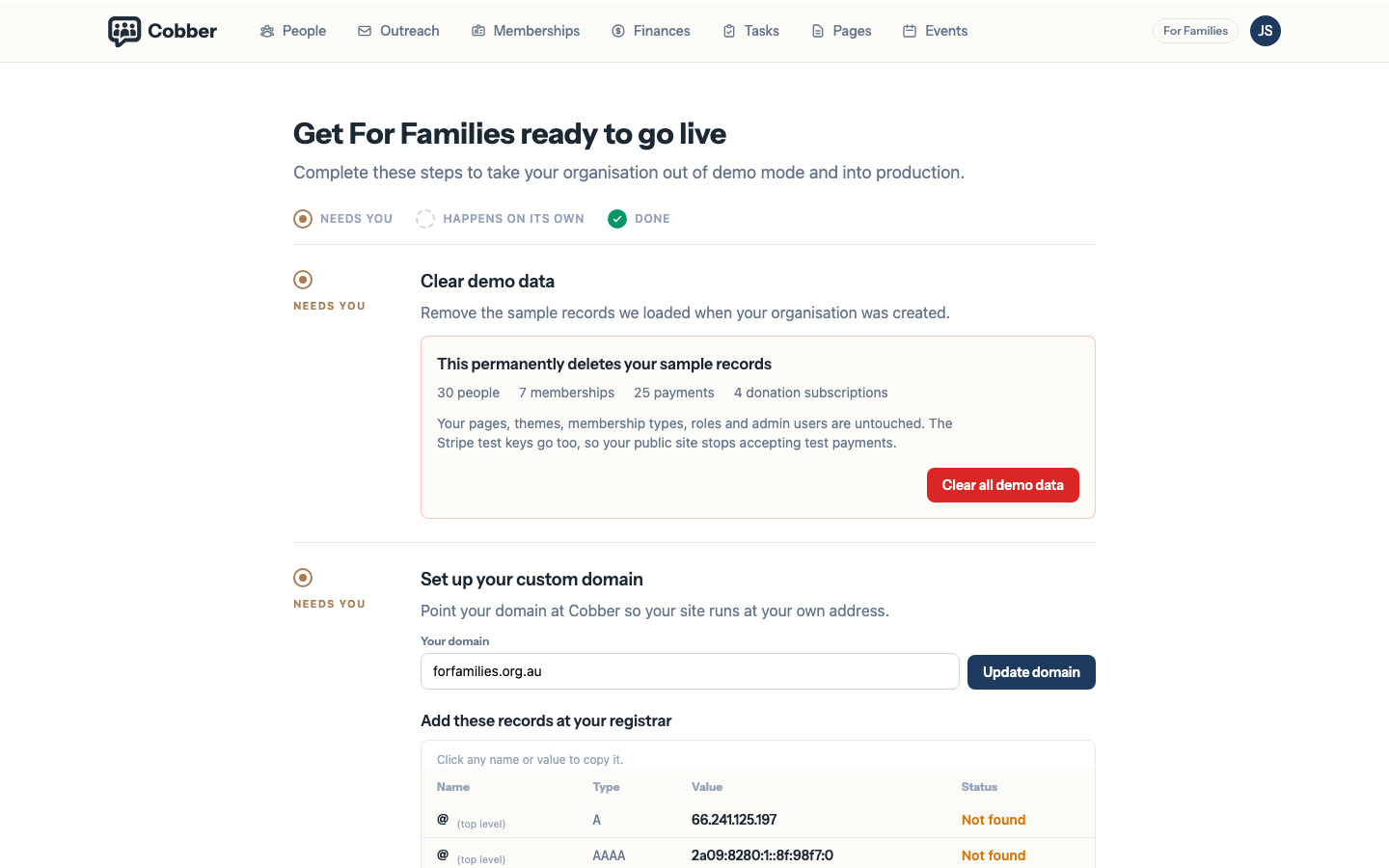
The Go Live page, showing the change to make with your DNS provider. Once you have made the change, the same page checks it. See Checking the records actually landed below.
-
Cobber secures it with HTTPS automatically
Once your address points at us, Cobber provisions and renews the security (SSL/TLS) certificate for you, so the padlock “just works” with no extra steps.
Checking the records actually landed
Every time the Go Live page loads, Cobber looks up your domain in public DNS
and compares what is published against what it expects, for every address on the
certificate — usually your apex domain and www, or just the subdomain.
Two things are worth knowing before you read that check.
Both an A record and an AAAA record have to be right. They are two ways of finding the same server — one for the older addressing scheme, one for the newer — and the certificate will not issue while either one points somewhere else. A domain with a perfect A record and a wrong AAAA record loads fine in a browser and never gets its padlock.
A wrong record is not an obviously broken record. The failure that prompted this check was a single missing digit in an apex A record. The address it pointed at was a real, working server — just not ours. Nothing looked broken, the domain resolved, and the certificate quietly never issued. That is why the page reports what it found rather than a simple yes or no: a value that is present but wrong needs a different reaction from one that is missing entirely.
If the check says a record is missing, add it. If it says the record points somewhere else, compare it character by character with the value on the page — it is almost always a transposed digit or a truncated paste.
Your address starts serving your site only after this check has passed. Until Cobber has seen the records pointing here, the address is not connected to your site — it is not enough to have typed it in. Open the Go Live page (or press Check again on the domain step) after DNS has propagated. The safeguard exists so that nobody can attach an address to a site they do not control.
After that, visitors who go to your connected address see your site at that address. Your homepage, donation pages, petitions, sign-up and membership forms, and embeddable widgets all work the same way on every connected address for that website.
What happens when you connect your primary domain
When your primary website has a connected address in Go Live and DNS has been verified, Cobber treats that as your public home on the web:
- Supporters visiting your connected address see your published pages there.
- Visitors who open a published page or event on your Cobber subdomain are redirected to the same URL on your primary connected address. The redirect waits until DNS has been verified, so a typed-in address that is not pointing here yet cannot send supporters off-platform.
- Unpublished pages and draft events stay on the Cobber subdomain so your team can preview them while logged in — they are not redirected.
- Embeddable forms, donation checkout, and other action endpoints are not redirected; only public website pages and events are.
- Your dashboard stays on the Cobber subdomain — bookmark
yourmovement.cobberhq.com.au/dashboardfor day-to-day admin work.
Until you connect that address, published pages remain reachable on the Cobber
subdomain for preview (with noindex so search engines do not treat it as your
live site).
You can connect more than one domain
An organisation can have several connected addresses. That means you can start on the Cobber subdomain, add a subdomain of your own domain for launch, and later add your top-level domain — all pointing at the same content. Nothing breaks as you add addresses.
Your web address and your sending domain are separate
You can host your pages at one address and send email from a different one — for
example serve crm.yourmovement.org.au while sending from
email.yourmovement.org.au. Neither has to match the other. See
authenticating your sending domain.