Authenticating your sending domain
Proving to Gmail and Outlook that Cobber may send as you — the one setup job to start early.
Quick answers
8 questions · click to openWhy does this matter?
Until your sending domain is authenticated, campaigns show Sender not verified and nothing goes out. It’s the one setup job that can block everything else, and it depends on a DNS change, so start it early.
What records do I need to add?
Cobber generates the exact records for your domain and tells you what to add — there’s no generic list to copy. The Go Live page walks you through your first sending domain, and the Email domains page is where you add more.
The records look right but the domain still isn’t verified.
You still have to click Verify. Cobber checks public DNS every time the Email domains page loads and will tell you the records are correct, but that is Cobber looking — Postmark only marks the domain verified, and only enables sending, once you press the button.
How do I know whether my DNS records are right?
The Email domains page checks them for you on every page load and shows a status against each record: Found, Not found, or Points to something else. That last one is the useful case — a record that exists but has a typo in it looks fine at your registrar and is the hardest to spot by eye.
Will this break the email we already send?
No. Both mechanisms are purely additive: turning them on doesn’t remove, replace or interfere with the email authentication your existing system uses.
Does my email domain have to match my website address?
No. Your sending domain is completely independent of your web address. You can host your pages at crm.yourmovement.org.au and send email from email.yourmovement.org.au — or any other domain you control.
Can I send Cobber email from a subdomain?
Yes. You can authenticate and send from your top-level domain or from a subdomain. Sending from a subdomain is a tidy way to keep Cobber’s email clearly separate from your existing system during a transition.
Can I send from more than one domain?
Yes. Register as many sending domains as you like on the Email domains page. Any of them can be used as a from address once verified.
Cobber sends two kinds of email on your behalf:
- Transactional email — receipts, membership welcomes and renewals, volunteer and contact-form confirmations. These come from sensible addresses on your sending domain, like
donations@,membership@andcontact@. - Campaign email — mass emails to your supporters, sent from whatever from address and name you configure for the campaign.
Your sending domain is completely independent of your web address — you can serve
your pages from crm.yourmovement.org.au and still send email from
email.yourmovement.org.au. You can also register more than one sending domain.
What authenticating means
“Authenticating” a domain means proving to mailbox providers (Gmail, Outlook and the rest) that Cobber is allowed to send email as your organisation. This is what keeps your email out of spam and out of the way of impersonation. Cobber uses two standard mechanisms:
| Mechanism | What it does |
|---|---|
| DKIM | Cryptographically signs your outgoing mail so receivers can confirm it’s genuinely from you and hasn’t been tampered with. |
| Custom Return-Path | Handles bounces on a subdomain of yours and aligns your mail so it passes strict inbox checks (DMARC). |
You set this up once per domain and there’s no ongoing maintenance. The Go Live page walks you through your first sending domain, and the Email domains page is where you add more, see each domain’s status, and verify them. Either way Cobber generates the exact records specific to your domain, tells you what to add, and checks them for you — so you don’t have to work any of it out by hand.
Why this doesn’t clash with anything else. DKIM uses a unique selector — a label that identifies the signer — so Cobber’s signing key sits alongside any other provider’s without conflict. The Return-Path lives on its own subdomain. Both are purely additive: turning them on doesn’t remove, replace or interfere with the email authentication your existing system uses.
Sending from a subdomain
Just like your web address, you can authenticate and send from your top-level
domain (e.g. donations@yourmovement.org.au) or from a subdomain (e.g.
donations@action.yourmovement.org.au). Both are fully supported — the
authentication simply attaches to whichever domain or subdomain you choose to send
from.
Sending from a subdomain is a common and clean approach during a transition: it lets Cobber’s email run on its own clearly-separated domain while your existing system keeps sending from the main domain. It also keeps your sending reputations independent, which is good hygiene.
Managing your sending domains
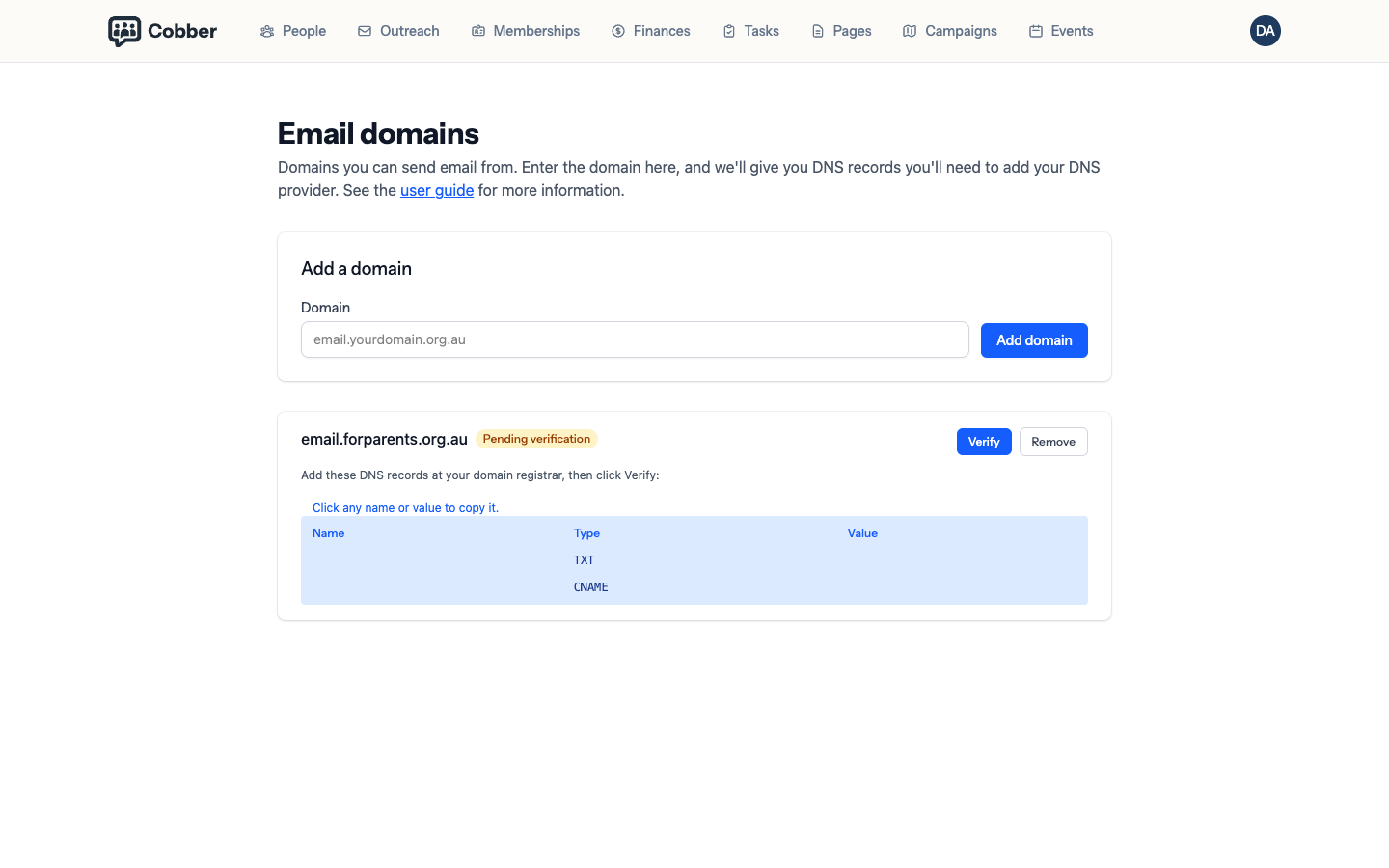
You can register as many sending domains as you like — each is independent of your web address, and any of them can be used as a from address. Manage them on the Email domains page in your dashboard. For each domain you add, Cobber shows the DNS records to add at your registrar and a status:
Cobber checks the records for you
Every time the Email domains page loads, Cobber looks up your DKIM and Return-Path records in public DNS and shows what it actually found against what it expects:
| Status | What it means |
|---|---|
| ✓ Found | The record is published and matches. Nothing to do. |
| Not found | Nothing is published at that name yet. Either it hasn’t been added, or it hasn’t propagated — give it an hour before assuming the worst. |
| × Points to … | Something is published, but it isn’t ours. Almost always a typo or a truncated value pasted into the registrar. This is the one worth looking at carefully, because it looks correct at a glance. |
Finding both records is not the same as being verified. This check is Cobber reading public DNS. Your email provider has to confirm the domain independently, and it only does that when you press Verify. If the page says both records are correct and the domain still says pending, the answer is almost always that nobody has clicked the button.
| Status | What it means |
|---|---|
| Not provisioned | The domain has been added but isn’t registered for sending yet. Cobber registers it and hands you the DNS records to add. |
| Pending verification | The domain is registered but not yet confirmed. Check the record status above: if either record reads Not found or Points to …, fix it at your registrar. If both read Found, the records are fine and the only thing left is to click Verify. |
| Verified | DKIM and Return-Path both check out. The domain is authenticated and ready to send from. |
A sending domain only needs to be verified before your emails use it — and “verified” always means you clicked Verify and it came back clean, never just that the DNS looks right.
Moving across from another platform? You don’t have to switch everything at once — see running Cobber alongside your existing system.