Check-in on the day
Marking people off at the door, from a phone, without a printed list.
Quick answers
8 questions · click to openCan I give someone check-in access without letting them edit the event?
Yes. Under Settings → Roles, assign **View events and check in attendees at the door** (`events.checkin`). They can open the event, see who's coming, add people to the attendee list, and run the door — but they can't create, edit, publish, or cancel events.
Do I need an app?
No. Check-in runs in the browser, so any phone works. Log in on the door device before people start arriving rather than while there's a queue.
How do I find someone quickly?
Type their name or email into the search box at the top. If they scanned or quoted a ticket code, you can switch to code entry instead — but searching is faster when someone is standing in front of you.
What if someone turns up who never RSVPd?
Add them on the spot. The same search box that finds people also adds walk-ins — search their name, and if they are not there you can create them with a first name, last name, email and mobile, then check them straight in.
What happens if two people check the same person in?
Cobber tells you they're already checked in, and shows the time they were checked in at, rather than silently double-counting. There's an Undo check-in button on that same message, so a wrong scan can be put right on the spot.
I checked in the wrong person. Can I undo it?
Yes. Undo appears next to the person on the attendee list, and on the warning you get if you scan someone twice. It puts them back to confirmed, clears the check-in time, and removes the check-in from their record — so an accidental scan doesn't leave them looking like you spoke to them.
Can I add someone to the list before the day?
Yes, from the Attendees tab on the event rather than the check-in screen. That books them as confirmed without marking them as having turned up, which is what you want for "book Sue in for next Tuesday". The door screen is for people who are actually in front of you.
Does check-in tell us anything afterwards?
Yes, and it's the most undervalued data you'll collect. Who actually turned up is a much stronger signal than who said they would. A check-in also counts as contact, so someone you greeted at the door stops reading as "never contacted" on their profile.
Check-in exists so you know who actually came, not just who said they would. That distinction is worth more than it sounds: attendance is the strongest signal of commitment you can collect, and it’s the list you want when you’re looking for volunteers, committee members or candidates.
Before the doors open
- Log in on the door device first. Not while there’s a queue.
- Brief whoever’s on the door on searching by name — it’s faster than hunting for a ticket code.
-
Open the event and go to check-in
The screen shows a running count of who has arrived, a single search box, and the Expected & checked in list underneath with everyone's ticket code and ticket type.
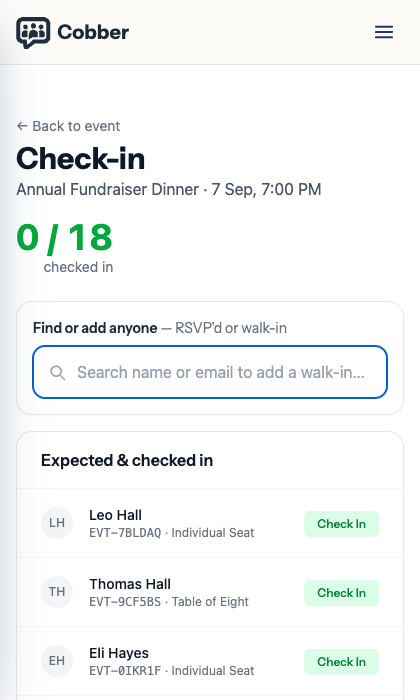
The check-in screen on a phone, with the running count and the attendee list. -
Find the person
Type a name or email into Find or add anyone. If they scanned a ticket or can quote a code, Scan ticket codes instead switches to code entry.
-
Check them in
One tap on Check In. If someone has already been checked in, Cobber tells you — with the time they were checked in at — rather than counting them twice, and offers Undo check-in on the same message.
Walk-ups
People who turn up without registering are usually the ones worth capturing — they came on a friend’s word.
The search box does double duty: it finds people who RSVPd and adds people who didn’t. Search for their name, and if nobody matches you can create them there and then with a first name, last name, email and mobile, and check them in without leaving the screen.
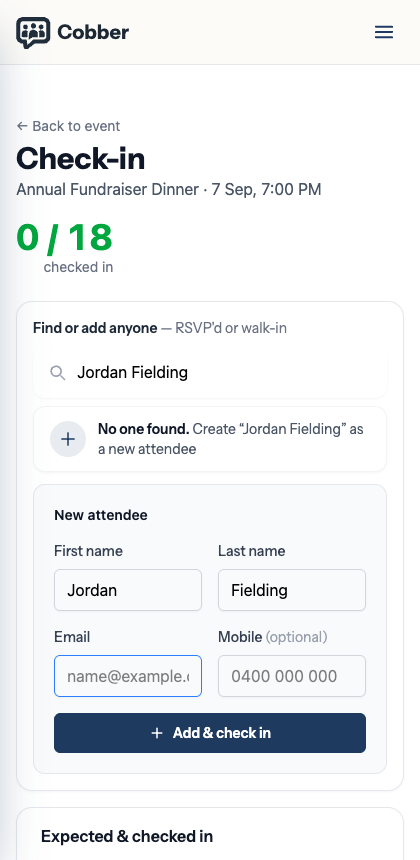
Thirty seconds at the door beats trying to reconstruct a name from memory a week later — and a walk-in captured properly is a supporter you can email tomorrow.
Undoing a check-in
Wrong person, double scan, someone checked in and then left before the thing started — all of it happens, and none of it should be permanent.
Undo sits in two places: next to each person on the Attendees list, and on the warning you get when someone is scanned twice. It’s deliberately on the warning, because that’s the moment you find out.
Undoing puts the person back to confirmed, clears the check-in time, and takes the check-in off their record entirely — which matters more than it sounds, because a check-in counts as contact (see below). An accidental scan that stayed on the record would leave someone reading as recently contacted by an organiser who never actually met them.
Booking someone in before the day
The door screen always marks people as having turned up, which is right when they’re standing in front of you and wrong for “book Sue in for next Tuesday”.
For that, use Add attendee — on the event page it’s in the ⋯ menu next to the attendee search, or open the Attendees tab. Search the people you can see, or create a profile from a name and email. They’re registered as confirmed, not checked in, so your attendance figures stay honest until the day. When you select an existing person, confirm their name before Cobber adds them to the list.
Two things worth knowing:
- On a paid event, adding someone from the dashboard issues a complimentary ticket. There’s no payment taken — if they should pay, send them the event page instead.
- Someone in another branch can still be added, and Cobber attaches the booking to their real record rather than creating a duplicate. You’ll get a read-only row and a note explaining why you can’t open their profile.
After the event
Attendance sits on the person’s record, and it counts as contact — the same as logging a conversation or an outreach call. Someone you greeted at the door stops reading as “never contacted” on their profile, which is usually the correct answer: an organiser physically welcomed them in.
Use it:
- Email everyone who came while it’s fresh, with the next thing to do.
- Ring the ones who seemed keen. A call campaign built from attendees is the warmest list you’ll ever work.
- Notice who RSVPd and didn’t come. That’s not a failure — it’s a group worth a different kind of follow-up.